 Thanksgiving Dance
“Beans, greens, potatoes, tomatoes”
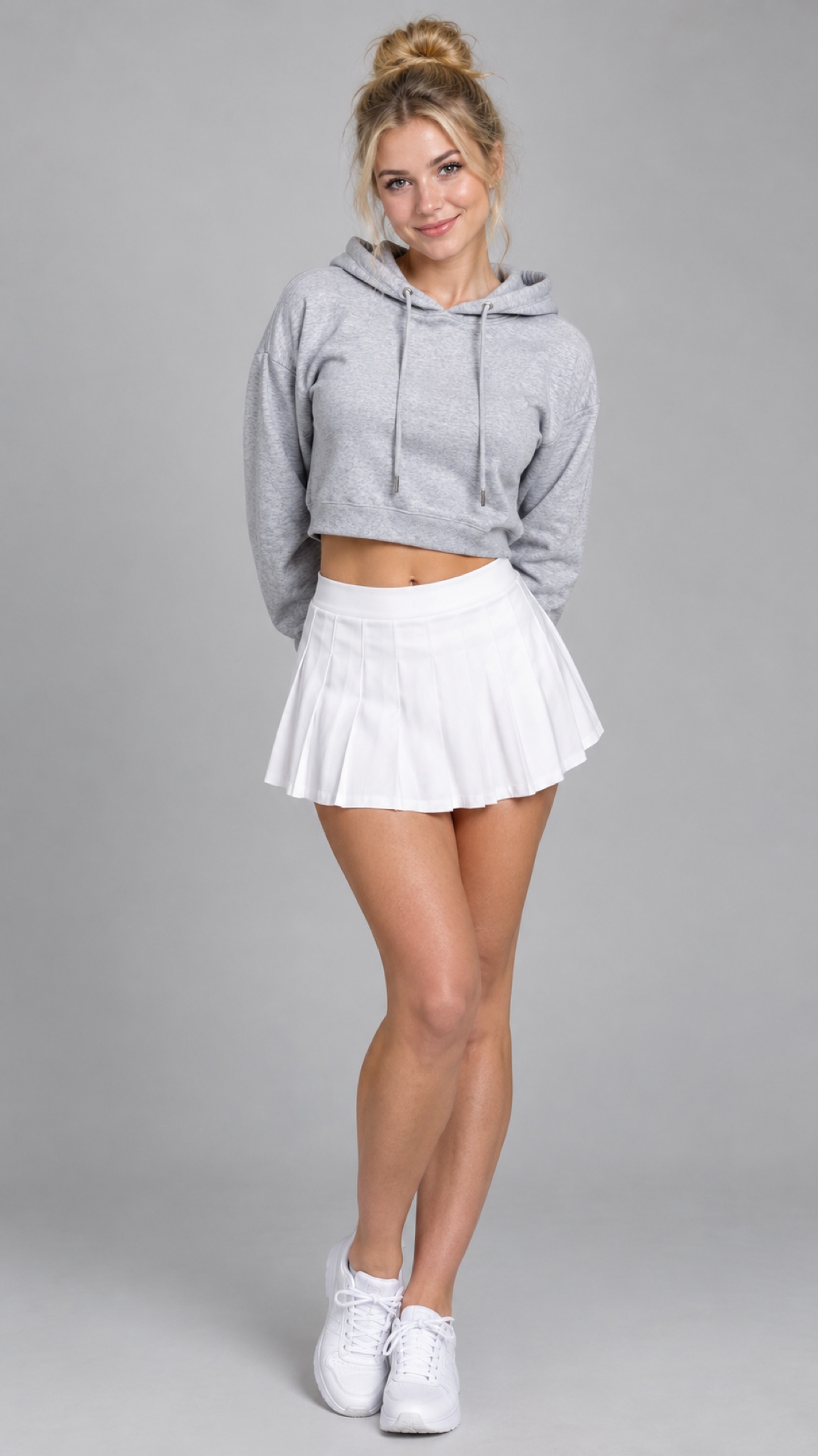
Our AI sample · made from one photo
Thanksgiving Dance AI Video Generator
Put yourself in the Beans Greens dance. One photo becomes a 13-second living-room routine with the shoulder taps, the bend and the original sound.
Original sound belongs to its owner. For personal sharing. When posting, use the sound from the app’s library.
- Pay once
- No sign-up
- Video in 3–10 min
The original Thanksgiving Bend
The posts that started it, embedded from each platform.
“Thanksgiving x bend”
The living-room dance that this template follows.
Original by @ssipp74 on TikTok, Nov 6, 2026. Embedded from TikTok.
From photo to Thanksgiving dance
One portrait, one living-room routine. Follow the grey hoodie from the still photo into the shoulder taps and low bend.
The Thanksgiving Bend in three moves
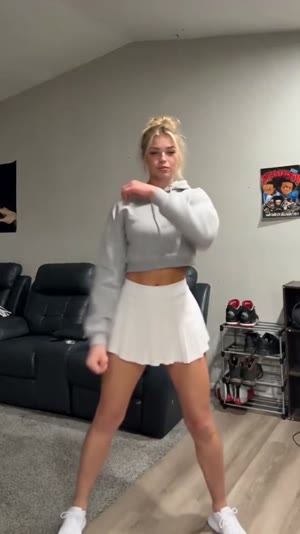
0–4 sec
Shoulder tap
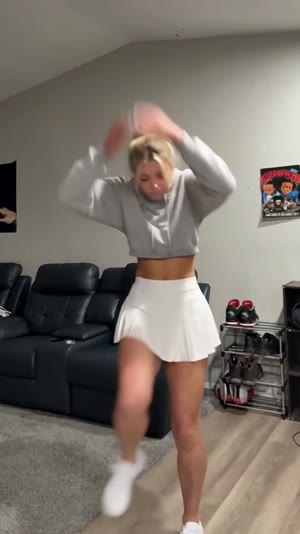
4–8 sec
Hands up
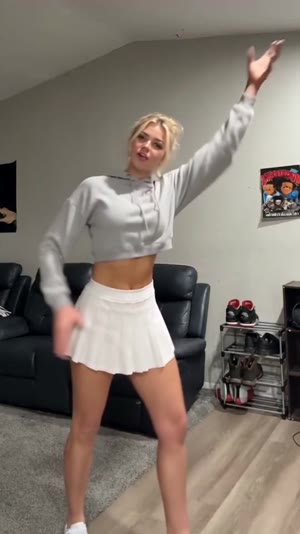
8–13 sec
High reach
Which photo works
- One person, face clearly visible
- Facing the camera, with your waist or knees visible
- Good light, no sunglasses
- Group photos
- Face turned away or covered
- Very dark or blurry
How it works
- 1
Pick a photo
Tap Make mine and choose one photo from your phone.
- 2
Choose and pay
Pick the quality and pay once ($8.90 for one video). No sign-up.
- 3
Get your videos
Your 9:16 13-second video is usually ready in 3–10 minutes. Download it or share it straight from the page.
Moves by second
| Time | Move |
|---|---|
| 0–4 s | Bounce side to side and tap across the shoulders. |
| 4–8 s | Raise both hands beside the head, bend, then swing the arms down. |
| 8–13 s | Reach up with one arm and step into a sideways lean. |
How it's made
- Your dance: 1 photo (1. Your photo) · Seedance 2.5 · 13 s · same frame as the original clip · original sound or silent · $8.90
Make it by hand
Want to try it yourself? Start from this model, these settings and this prompt. Results depend on your photos and on the model, so they can differ from the samples on this page.
- Save the original clip by @ssipp74 on TikTok. It is Video 1. If it runs longer than about 13 s, trim it to the part you want to copy.
- Choose one clear photo of the person (Your photo).
- Open Seedance 2.5 in its reference mode and attach Video 1 first, then the photo.
- Paste the prompt below and generate. The length follows Video 1 (about 13 s).
Prompt
Video 1 is the template. Follow it closely: camera, pacing, every move. Setting: a living room with a black sofa on the left, a shoe rack on the right, pale walls and a fixed phone camera.
Swap the performer for the person in my photo:
- Image 1 replaces the person in the middle, wearing the clothes from that photo.
Take the face, hair and build from my photo. Keep the face easy to see until the last frame.
Sound options
Your dance
- With the original sound
- Silent, for posting with the TikTok sound
Add the official sound in TikTok
- Open the @djsaucedup Beans Greens remix on TikTok and tap the sound.
- Tap Use this sound, upload your dance video and line up the shoulder taps with the first beat.
What is Thanksgiving Bend?
The Thanksgiving Bend pairs the Beans Greens chant with a living-room dance. Follow the shoulder taps, the hands by the head and the high arm swing in the sequence filmed by @ssipp74.
The chant goes back to the 2016 “You Name It” Thanksgiving meme. Hear how the meal list sounded in the VocalTeknix edit, then listen to the remix and watch the living-room routine.
- On November 5, 2026, @djsaucedup posted the Beans Greens remix. Listen for the repeating pulse under the roll call of Thanksgiving dishes. (@djsaucedup on TikTok, Nov 5, 2026)
- On November 6, @ssipp74 posted a living-room take on the Thanksgiving Bend. The shoulder taps, low bend and high reach in this clip are the moves used here. (@ssipp74 on TikTok, Nov 6, 2026)
Wondering what is real? Read Is Thanksgiving Bend real or AI?
Make your own Beans Greens video
Choose a photo that leaves room for the bend
Use a front-facing photo of one adult. A waist-up or full-body shot gives the dancer visible shoulders and an outfit to carry into the clip. The raised-arm section is easier to recognize when a hood, phone or another person is not covering the face.
Match the opening beat when you post
For a group chat, download the version with the original sound. For TikTok or Reels, take the silent version and select the track inside the app. Start at the first shoulder tap, then scrub forward to check that both hands rise beside the head together.
If your dance looks or sounds off
- The face is hard to recognize during the lean.
- Start with an evenly lit photo taken straight on. A side profile or a phone held in front of the face gives the animation less detail to work with.
- I hear two copies of the song after uploading.
- Use the silent download with the sound from the app’s library. If you already imported the original-sound video, turn its clip volume down before adding the track.
Thanksgiving Dance at a glance
Best for making Thanksgiving Bend with your own face from one photo, paid once, no sign-up.
- Input
- One person, face visible, waist up or full body, for Beans Greens Thanksgiving Bend. One person, face clearly visible; Facing the camera, with your waist or knees visible; Good light, no sunglasses.
- Output
- One 9:16 vertical video, about 13 seconds, 480p, no watermark. Beans Greens Thanksgiving Bend offers two versions: With the original sound / Silent, for posting with the TikTok sound. MP4 download, plus a no-music and a no-caption version.
- Speed
- Usually ready in 3–10 minutes.
- Price
- One-time: 1 video $8.90, 3 videos $22.90, 10 videos $69.90. Euro area €8 and UK £7 for one video. HD (rendered natively at 720p): 1 video $15.90, 3 videos $44.90; euro area €15 and UK £13 for one video. No subscription.
- If it fails
- If a video fails to generate, that credit comes back automatically so you can try again. This is not a cash refund.
- Sign-up
- None. The link to your videos is emailed to the address you pay with.
- Your photo
- Used only to check it and to make the video.
- Photo deleted
- About a day after the video is finished.
- Unused upload
- Deleted within two days if you never make a video.
- Finished video
- Not deleted automatically. Email support@thanksgivingdance.com from the address you paid with to delete the video and the email.
- Refund
- Not happy with the result? For example, the face does not look like you or the arms miss the bend. Email support@thanksgivingdance.com and ask. We refund the original payment.
How we compare: Best Thanksgiving Bend AI video generators
What you need for a Thanksgiving Bend video
What it needs and what you get.
Thanksgiving Dance AI Video Generator
A solo dancer does the Thanksgiving Bend in a living room.
One person, face visible, waist up or full body · 13 s · With the original sound / Silent, for posting with the TikTok sound
Beans Greens Thanksgiving Bend template
Pricing
One-time packs. No subscription, no sign-up.
You pick the photo after you pay.
FAQ
Which Beans Greens dance does my photo follow?
It follows @ssipp74’s living-room routine. Your dancer taps across the shoulders, brings both hands beside the head, bends and finishes with a sideways step and reach.
Do I need to film myself doing the moves?
One still photo supplies the face and outfit. The template supplies the dance and the room, so there is no choreography to film or prompt to write.
Can I send the clip straight to the family group chat?
Yes. Save the MP4 with original sound to share the dance with its beat. The silent copy is useful when you want to choose a sound in TikTok or Reels.
How do I make Thanksgiving Bend AI video?
Tap Make mine, pick one photo, choose a quality and pay once. Your 13-second video is usually ready in 3–10 minutes and is emailed to the address you pay with.
How much does it cost?
One video is $8.90, three are $22.90 and ten are $69.90. One-time payment, no subscription, no sign-up.
What photo works best?
One person, face clearly visible. Facing the camera, with your waist or knees visible. Good light, no sunglasses. Avoid: group photos, face turned away or covered, very dark or blurry.
Does it have sound, and is it lip-synced?
Beans Greens Thanksgiving Bend offers two versions: With the original sound / Silent, for posting with the TikTok sound. Beans Greens Thanksgiving Bend follows the timing of the trend clip, with two options (With the original sound / Silent, for posting with the TikTok sound), and is not lip-synced. All are AI-generated, so expect differences from a real performance.
What if my video fails?
If a video fails to generate, that credit comes back automatically so you can try again. This is not a cash refund.
Is Thanksgiving Bend real?
Read Is Thanksgiving Bend real or AI? for where the original came from.
What can I not upload?
Photos of minors, of public figures, or of anyone without their permission. See the Acceptable Use policy.
What happens to my photo?
- Your photo: Used only to check it and to make the video.
- Photo deleted: About a day after the video is finished.
- Unused upload: Deleted within two days if you never make a video.
- Finished video: Not deleted automatically. Email support@thanksgivingdance.com from the address you paid with to delete the video and the email.
Can I get a refund?
Not happy with the result? For example, the face does not look like you or the arms miss the bend. Email support@thanksgivingdance.com and ask. We refund the original payment.